Robotic Hands with Game Controllers: A Practical Review of a Versatile Vector Art Collection
Visual content for gaming, technology, and futurism often relies on clichés or overly complex imagery. The Robotic Hands with Game Controllers collection takes a different approach. This set of black-and-white line art merges mechanical hand forms with classic and modern gaming input devices, all rendered in high-contrast vector style. For anyone producing content, marketing materials, or educational resources that touch on gaming, robotics, or human-machine interaction, this collection offers a clean, scalable, and immediately usable asset library.
The full package delivers SVG, PNG, JPG, and EPS files inside a single ZIP folder. With 100 vector SVG and EPS files included, the artwork retains sharp edges and consistent contrast regardless of how much you scale it. This alone makes the collection worth a close look for professionals who need reliable, distortion-free graphics across print and digital channels.
What Makes This Collection Distinct
Many vector art packs lean heavily on color gradients, shading, and complex textures. That approach can look impressive but often creates compatibility problems across platforms or requires extensive editing to fit a specific brand palette. This collection strips things down to black-and-white line art with strong contrast. The result is a set of graphics that work immediately in monochrome layouts, screen printing, icon sets, and even embroidery workflows.
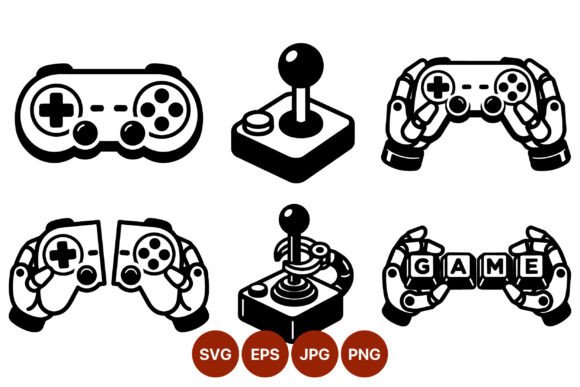
The thematic focus is narrow but executed thoroughly. Each piece features robotic hands interacting with game controllers. Some hands grip a classic joystick with a retro arcade feel. Others hold modern gamepads with ergonomic curves and multiple buttons. A few illustrations show hands pressing or assembling key caps that spell out "game" directly. This variety gives you options for representing different eras of gaming hardware while staying visually consistent through the shared robotic hand motif.
The high-contrast line work means the illustrations remain readable at small sizes, such as social media avatars or UI buttons, and equally effective when enlarged for posters or banners. There is no loss of detail because the files rely on vector paths rather than raster pixels.
Real-World Performance and File Format Flexibility
When evaluating any asset collection, format support is a practical concern. This pack covers four widely used formats: SVG, PNG, JPG, and EPS. That range ensures you can open and edit the files in nearly any modern design application, whether you use Adobe Illustrator, Affinity Designer, Inkscape, or even a web-based tool like Figma or Canva (via SVG uploads). The EPS files also provide backward compatibility with older software, which matters in environments where teams work across different versions of design applications.
The PNG files come ready for immediate drag-and-drop use in documents, slide decks, or web pages without needing to open a vector editor. The JPG versions offer a smaller file size option for situations where transparency is not required. However, the real strength lies in the SVG and EPS files. These give you full control over stroke weight, scaling, and customization. If you need to invert the artwork, change the line color from black to white for dark backgrounds, or remove specific elements, you can do so quickly because the vector paths are clean and uncluttered.
In testing, the files load quickly and render without artifacts. The line art is consistent across all 100 illustrations, which matters when you need a cohesive set of visuals for a project such as a gaming magazine layout, a tech blog header series, or a set of classroom handouts about input devices.
Who Benefits Most from This Collection
This collection suits a broad range of professionals, but specific groups will find it especially valuable.
Content Creators and Bloggers
If you write about gaming hardware, robotics, or the evolution of user interfaces, having a set of matching illustrations saves time and ensures visual consistency. You can pull a PNG file directly into a blog post about retro joysticks or use an SVG to create an infographic comparing controller layouts. The black-and-white style also prints cleanly, so if your blog offers downloadable PDF guides, these images will reproduce well on paper.
Marketers and Small Business Owners
Promotional materials for gaming events, eSports tournaments, or tech workshops often need bold visuals that work across flyers, social media, and website banners. The high-contrast line art stands out on colored backgrounds and can be recolored quickly to match brand guidelines. Because the files are vector-based, you can resize the same illustration for a billboard, a business card, or a mobile ad without asking a designer to rework the file.
Educators and Trainers
Teaching materials about input devices, human-computer interaction, or robotics benefit from clear, simple visuals. These illustrations strip away unnecessary detail, making it easier to highlight the mechanical hand structure or the controller layout. You can use the SVG files in interactive whiteboard software or insert PNG versions into slide decks. The consistent line style helps students focus on the content rather than distracting visual noise.
Freelancers and Hobbyists
If you take on freelance design projects that involve gaming or technology themes, having a library of 100 ready-to-use vector elements can speed up your workflow considerably. You can use the art as a base for custom compositions, combine it with text for logo concepts, or incorporate it into merchandise mockups. The EPS format also works with laser-cutting software, opening up possibilities for physical goods like acrylic signs or etched keychains.
Strengths and Practical Value
The collection's main strength is its disciplined visual coherence. Every illustration uses the same line weight and contrast level, so you never have to "match" two pieces from the set. That might sound minor, but anyone who has mixed assets from different sources knows how jarring it can be when line thickness varies from one image to the next.
The thematic variety within the narrow scope is another practical plus. You get both classic and modern controllers, different hand poses, and key cap arrangements. This range lets you build a visual narrative about the evolution of gaming input without sourcing multiple separate collections.
Long-term value is strong because vector files do not degrade. You can archive the ZIP folder and use the assets years later, scaling them for new media formats as they emerge. The high-contrast black-and-white style also avoids trends that might make the artwork look dated; it has a technical, almost schematic quality that remains functional across decades of use.
Possible Limitations to Consider
No collection is perfect for every situation. The black-and-white line art approach means you will not have color variations or shading to suggest depth or lighting. If your project requires photorealistic or fully rendered imagery, this set will not replace a more detailed 3D or photographic solution. The style works best when you want clarity, contrast, and a clean technical aesthetic.
Additionally, the focus on robotic hands means the controllers are always depicted in the context of a mechanical grip. If you need controller-only graphics without any hand elements, you will need to edit the SVG files to isolate the controller outlines. That is possible with any vector editor, but it is an extra step worth noting.
Finally, the collection contains exactly 100 files. For a large-scale project like a 200-page printed book, you may find yourself reusing certain illustrations. That is manageable if you vary placement and size, but it is not an infinite library. Consider your project's total visual needs before purchasing.
Practical Recommendations for Using This Collection
To get the most out of this asset pack, start by reviewing all 100 SVG files in your browser or design application. Look for illustrations that match the specific controller types or hand poses relevant to your project. Group similar images together so you can apply consistent scaling and styling.
If you need color versions, duplicate an SVG file and apply a stroke color change. The clean line art takes color well, and you can create multiple color variants from a single black-and-white source. For print projects, test the artwork at your intended output size early. The vector format handles large scales easily, but confirm that the line weight appears as intended for your specific medium.
For web use, SVGs offer the smallest file size while maintaining infinite resolution. Embed them directly in HTML or upload them to content management systems that support SVG. The PNG files work as a fallback for older platforms that do not handle SVGs reliably.
Consider combining multiple illustrations to create composite scenes. For example, you could place a retro joystick illustration next to a modern gamepad image to create a before-and-after comparison in a presentation. The consistent line style ensures the composite looks like a single designed piece rather than a collage of mismatched sources.
Final Observations
The Robotic Hands with Game Controllers collection fills a specific niche with thoughtful execution. It provides 100 matching vector illustrations that balance thematic focus with practical variety. The black-and-white high-contrast style keeps the art legible at any size and compatible with a wide range of uses, from digital publishing to physical fabrication. Professionals who need clean, scalable, and thematically consistent visuals for gaming, robotics, or interface-related content will find this pack a reliable resource. It does not attempt to be all things to all users, and that focused approach is precisely what makes it valuable for the projects where it fits.