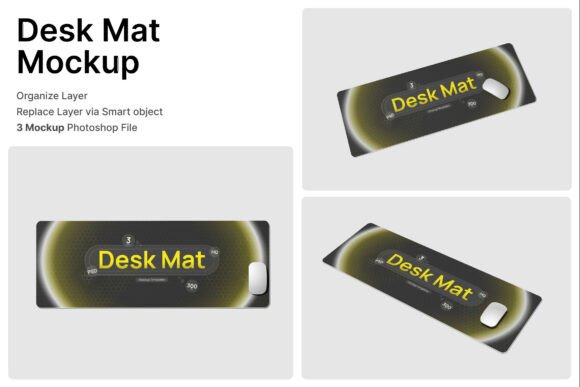
The Essential Guide to Using a Desk Mat 3D Mockup for Product Visualization and Branding
Getting a product from digital concept into a customer’s hands involves many stages, but one of the most critical is visualization. If you design or sell desk mats—whether for gaming, office use, or as branded merchandise—you know that a flat JPEG of the pattern does not tell the full story. This is where the Desk Mat 3D Mockup becomes an essential tool in your creative workflow. It lets you create a realistic, context-rich image of your design placed in a functional environment, bridging the gap between creation and presentation without the upfront cost of physical samples.
The mockup files included—specifically the 3 PSD files and accompanying help guide—are built around efficiency. They are designed for people who need high-quality results quickly, whether you are a freelance designer validating a concept with a client or a marketing team rolling out a new line of desk accessories. By integrating smart object layers into a structured file, the Desk Mat 3D Mockup removes the technical friction from product visualization.
Where the Desk Mat 3D Mockup Fits in Your Creative Process
To get the most out of any mockup, it helps to understand where it slots into your broader workflow. The Desk Mat 3D Mockup is not an end in itself; it is a bridge between design creation and final delivery. It serves different purposes depending on where you are in a project.
- Before Production (Client Approval & Planning): Before you commit to a bulk order from a manufacturer, you need to validate the design. The mockup allows you to present variations to a client or stakeholder with minimal effort. Does the neon cyan pattern work with the dark RGB keyboard? Can the company logo be seen clearly under the mouse? The smart object layers in the PSD files make swapping designs effortless. Double-click the layer, place your artwork, and save. This rapid iteration is crucial for aligning vision before a single unit is printed, saving significant time and material cost.
- During Design (Iteration & Refinement): The mockup acts as a testbed for your graphics. Because it features realistic extended desk pad scenes with mouse placement perspectives, you can see exactly how your 2D design translates into a 3D space. You can observe how shadows fall, how the edge stitching interacts with the pattern, and whether the scale of a logo feels appropriate. This visual feedback allows you to adjust contrast, logo placement, or pattern density to ensure the final print looks balanced and professional.
- After Completion (Marketing & Merchandising): Once the design is locked, the mockup instantly becomes a marketing asset. The package includes high-resolution 4000 x 3000 pixel files at 300 DPI, suitable for both web use and high-quality print catalogs. You do not need to re-create the wheel for every platform. You simply export the required angles from the same mockup file. This consistency strengthens brand recognition and speeds up go-to-market timelines.
Technical Setup and Usability: Building a Seamless Integration
Understanding the technical workflow is key to making the Desk Mat 3D Mockup a reliable part of your toolkit. The product is designed for users who value clarity and efficiency.
The Smart Object Workflow
The included PSD files rely heavily on smart objects. This is a non-destructive editing method that offers significant advantages. Instead of dealing with complex layer masks or transformation tools, you simply double-click the smart object thumbnail in the Layers panel. A new window opens containing a flat placeholder layer. You paste your design, scale it to fit the guides, and hit save. The magic happens automatically. The parent file updates instantly with the new design applied to the correct perspective and lighting. This makes it exceptionally easy to organize. You can keep the master mockup file untouched while generating dozens of design variations for different clients or products.
Handling Resolution and Scaling
The 4000x3000 resolution ensures your mockup images look crisp on retina displays and large-format prints. When placing designs into the smart object, always do so at a comparable resolution to avoid pixelation. If your design is a raster image, ensure it is at least 300 DPI at the mat’s real-world size. For vector-based logos or patterns, placing a high-resolution PNG or an embedded smart object preserves sharp edges. This attention to detail directly impacts the perceived quality of your product presentation.
Managing External Assets
The product listing notes that "All Image stock inside are not included." This is standard practice for professional mockup files. The benefit is complete creative control. You are not locked into someone else’s choice of keyboard, mouse, or desk setup. You can source your own peripherals—photographing your actual products is best for accurate branding—or use high-quality, free-standing PNGs from stock libraries. This allows the Desk Mat 3D Mockup to fit neatly into a larger brand asset management system. Keep a folder of your frequently used peripherals cropped and shadowed so you can drop them into the scene quickly.
Practical Implementation Across Key Use Cases
The Desk Mat 3D Mockup is versatile enough to serve a wide range of professionals. Here is how different users can integrate it into their daily routines.
Esports and Gaming Branding
If you work in gaming or esports, presentation is everything. Your audience expects dynamic, high-energy visuals. The Desk Mat 3D Mockup provides perspective angles that mimic a real gaming setup, including mouse placement and keyboard positions. Workflow: Design the mat in Illustrator or Photoshop. Import the design into the smart object. Add a high-quality PNG of a popular gaming mouse and a mechanical keyboard. Export the final image for a "Streamer Setup" social media post or product page. The realism of the mockup helps convey the scale and texture of the desk pad, which is critical for a peripheral that covers a large surface area.
Office Branding and Workplace Accessories
Corporations and coworking spaces often look for branded merchandise that feels premium. A desk mat is a perfect medium for subtle, professional branding. Use the Desk Mat 3D Mockup to place a company logo on a sleek, leather-textured or minimalist surface. Pair it with a laptop mockup and a stylus. This creates a cohesive "return to office" or "employee onboarding" kit visualization. The high resolution allows you to crop into details like the stitched edges or the texture of the fabric, demonstrating quality to procurement managers.
E-commerce Merchandising
On platforms like Amazon, Etsy, or Shopify, the main image drives clicks. A flat, isolated product shot is often required, but lifestyle images showing the product in use convert browsers into buyers. The Desk Mat 3D Mockup provides this context immediately. Workflow: Finalize your design. Generate 5 different angles from the PSD files. Use one angle as the background context for your hero image. Use others as gallery images to show scale and setup. This avoids the need for expensive product photography for every new SKU.
Freelance and Agency Deliverables
For freelance designers and agency professionals, efficiency directly impacts revenue. Purchasing a high-quality mockup set saves hours of setting up lighting and 3D rendering software. You can offer "Product Visualization" as an add-on service to your design packages. The included PDF help guide ensures you do not waste time figuring out the basics. By standardizing your presentation output with the Desk Mat 3D Mockup, you make your work look consistent and polished, which builds trust with clients.
Quality Control and Long-Term Consistency
Using a mockup is not just about speed; it is about maintaining a standard. Here is how the Desk Mat 3D Mockup contributes to long-term quality control.
- Brand Consistency: By using the same mockup angles for all your product launches, you build a cohesive visual library. Customers immediately recognize your brand’s aesthetic. The consistency of the lighting and shadows across the mockup set ensures every product looks its best without appearing mismatched. This is vital for a professional brand identity.
- Organizing for Scale: Create a structured folder hierarchy on your machine. For example: Master_Mockups > Desk_Mat_3D_Angles. Inside, keep the base PSD files untouched. Create sub-folders for each client or product line. This prevents broken links and lost files, which can be a major time sink in busy periods.
- Attention to Detail: Before uploading to a client proofing site, zoom into your mockup export. Check that the smart object scaling did not introduce artifacts. Verify the perspective aligns with the physical proportions of a real desk pad. The 300 DPI resolution gives you the safety net for close inspection, ensuring the final output is pixel-perfect.
Integrating the Mockup into Your Daily Routine
Integrating the Desk Mat 3D Mockup smoothly into your work requires a small investment of initial setup time, but the returns in efficiency are substantial. Start by customizing the base PSD files with your brand colors and preferred peripherals. Save this as a template. Now, whenever a new design is finished, you simply open the template, update the smart object, and export. This removes the friction of starting from scratch each time.
The mockup also interacts well with other tools and methods. If you use project management software or client portals, you can export low-resolution previews from the PSD for quick feedback, then render the final high-resolution exports for delivery. It turns the mockup from a standalone graphic into a functional part of your production pipeline.
Ultimately, the Desk Mat 3D Mockup is about taking control of your visual narrative. It empowers you to present your work in its best light, adapt quickly to client feedback, and maintain a high standard of quality across every project. Whether you are a solo creator, an entrepreneur launching a new product line, or a marketing manager rolling out branded merchandise, the ability to generate realistic, high-resolution visualizations on demand is a practical asset that pays for itself in time saved and professional credibility earned.