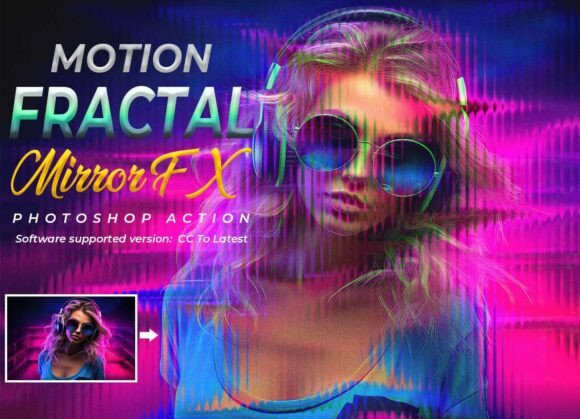
Motion Fractal Mirror FX: A Practical Evaluation for Digital Artists
Creating visually arresting digital art often requires a blend of technical skill, creative vision, and the right set of tools. For artists and designers exploring futuristic, high-energy aesthetics, the Motion Fractal Mirror FX Photoshop action has emerged as a notable option. This article provides a balanced, practical evaluation of this tool, helping you determine whether it aligns with your workflow, style, and project needs. We will explore its capabilities, discuss situations where it excels, and consider scenarios where alternative approaches might be more suitable.
What Is Motion Fractal Mirror FX?
At its core, Motion Fractal Mirror FX is a pre-programmed sequence of operations for Adobe Photoshop that automates a complex series of visual effects. It combines motion blur, fractal mirror reflections, kaleidoscope distortion, neon glow lighting, and cinematic color grading into a single, one-click workflow. The action is designed to transform ordinary photographs into vibrant, abstract, futuristic artworks with minimal manual intervention. It includes a PSD displacement file, an ATN action file, and a help file with a video guide, making it accessible even to users with limited Photoshop experience.
The key premise is efficiency: instead of manually building layered effects from scratch, the action applies a cohesive set of transformations that produce a polished, high-energy look. The result is a non-destructive, fully editable layer stack, allowing users to fine-tune each element after the initial application. This balance between automation and customization is central to its value proposition.
Exploring the Core Capabilities
To evaluate Motion Fractal Mirror FX effectively, it helps to understand the specific effects it bundles together and how they interact.
- Motion Blur: Adds directional blur that suggests speed or movement, creating a dynamic sense of energy within the composition.
- Fractal Mirror Reflections: Generates mirrored, repeating patterns that produce symmetrical or quasi-symmetrical structures, reminiscent of fractal geometry.
- Kaleidoscope Distortion: Applies a multi-faceted reflection effect that divides the image into repeating radial segments, similar to looking through a kaleidoscope.
- Neon Glow Lighting: Introduces vibrant, luminous highlights and edge lighting that gives the artwork a futuristic, cyberpunk-inspired aesthetic.
- Cinematic Color Grading: Adjusts the overall color palette and contrast to evoke a specific mood, often with teal-orange or high-saturation schemes common in sci-fi and action genres.
When combined, these elements produce a distinctive visual style that is difficult to achieve manually in a short amount of time. The action's ability to deliver this composite effect in one click is its primary strength.
Who Might Benefit Most from This Tool
Understanding the ideal use cases for Motion Fractal Mirror FX can help you decide if it fits your workflow.
Photographers Seeking Creative Effects
Portrait and fashion photographers who want to add an abstract, futuristic edge to their images may find this action useful. It can transform a standard studio portrait into a striking piece of digital art suitable for album covers, editorial spreads, or social media content. The automated workflow reduces the time spent on post-processing, allowing photographers to experiment with different looks quickly.
Graphic Designers and Digital Artists
Designers working on music covers, gaming posters, or cyberpunk-themed projects can leverage the action to generate base textures and compositions. The fully editable layers mean that a designer can start with the action's output and then refine, combine, or override individual effects to suit a specific brief. The high-resolution output ensures the results are suitable for print or large-format displays.
Content Creators and Social Media Managers
For those who need visually impactful content on a regular schedule, the one-click workflow offers significant time savings. Whether creating Instagram posts, YouTube thumbnails, or promotional graphics, the action provides a consistent, recognizable aesthetic that can help build a visual brand identity.
Beginners and Non-Designers
The action requires no advanced Photoshop skills. With the provided help file and video guide, someone with basic layer and file management knowledge can produce professional-looking results. This lowers the barrier to entry for individuals or small businesses that lack dedicated design resources.
Important Considerations and Limitations
While Motion Fractal Mirror FX offers clear benefits, a balanced evaluation must also consider its tradeoffs and limitations.
Compatibility Constraints
The action has been tested on Photoshop CC2022 English version and is reported to work on versions from CC through CC2022. Users with non-English versions of Photoshop may encounter issues, as actions often rely on specific layer names and menu commands that differ across languages. Similarly, users on older or newer versions of Photoshop (e.g., CS6 or CC2023+) should verify compatibility before purchase. This is a significant practical consideration for anyone not using the specified software versions.
Stylistic Specificity
The combined effect of motion blur, fractal mirrors, and neon glows produces a very particular futuristic aesthetic. This style may not suit every project. For applications requiring realism, subtlety, or a more traditional photographic look, this action will likely feel overwhelming. The output is inherently abstract and high-energy, which limits its versatility. Artists whose work demands a restrained or natural palette may find the action's output difficult to adapt.
Dependence on Source Image Quality
Like all automated tools, the final result depends heavily on the quality and composition of the source image. Images with clear subjects, defined edges, and good contrast tend to produce more compelling results. Low-resolution, poorly lit, or cluttered images may yield confusing or unattractive outputs. The action amplifies existing features, so starting with a strong image is essential.
Automation vs. Creative Control
Although the action produces editable layers, the initial transformation is still automated. Artists who prefer to build effects from scratch or who have a very specific vision may find the action's preset combinations limiting. The tool is best thought of as a starting point or a creative catalyst rather than a final deliverable. Relying solely on the action without further customization can result in artwork that feels generic or derivative.
Comparing Alternatives: When to Look Elsewhere
No single tool fits every situation. Understanding when Motion Fractal Mirror FX may not be the best choice is just as important as recognizing its strengths.
When Realism or Subtlety Is Required
Projects that demand photorealistic rendering, such as product photography, architectural visualization, or documentary-style imagery, are not suitable for this action. The abstract, high-saturation effects will conflict with the goal of natural representation. In these cases, manual masking, gradient maps, and selective color grading offer more controlled results.
When Full Creative Autonomy Is Needed
Artists who derive satisfaction and originality from building their own effects layer by layer may find a pre-packaged action too restrictive. While the editable layers provide some flexibility, the underlying structure of the effect is fixed. For those who prefer to explore custom blending modes, custom brushes, or manual fractal generation, building from scratch may be more fulfilling and produce more unique outcomes.
When Working with Non-Compatible Software
Users of Adobe Photoshop Elements, Affinity Photo, GIMP, or other image editing software cannot use this action directly. While some effects can be replicated manually, the seamless one-click integration is lost. Similarly, users on non-English Photoshop versions should consider whether the potential language compatibility issues outweigh the convenience.
When Budget Is a Primary Concern
Premium Photoshop actions vary in price, and while Motion Fractal Mirror FX offers a specific bundled set of effects, free or lower-cost alternatives exist for individual components. For example, one can apply motion blur manually, use free kaleidoscope patterns, or experiment with color lookup tables. The tradeoff is time and technical knowledge versus upfront cost. For a one-off project, manual methods may be more economical; for repeated use, the action saves substantial time.
Practical Decision-Making Insights
To determine whether Motion Fractal Mirror FX aligns with your goals, consider the following practical questions:
- What is the typical style of your projects? If you regularly create futuristic, abstract, or high-energy visuals, this action is a strong fit. If your work leans toward minimalism, realism, or vintage aesthetics, it may not serve your needs.
- How much time do you spend on post-processing? If you need to produce high-impact visuals quickly and consistently, the one-click automation is a genuine time-saver. If you enjoy the process of manual composition and have ample time, the action may feel like an unnecessary shortcut.
- Are you comfortable with customization? The action's value increases when you treat its output as a starting point. If you are willing to adjust layers, masks, and blending options after the initial run, you can achieve more personalized results. If you expect a finished product straight out of the action, you may be disappointed.
- Do you have a compatible Photoshop version? Verify that your software matches the supported versions listed. This is a non-negotiable technical requirement. If you are unsure, consider contacting the seller or checking user reviews for your specific version.
- What is your budget for tools? Weigh the cost of the action against the value of the time it saves. For frequent users, the investment is likely justified. For occasional use, consider whether manual alternatives or free actions might suffice.
Final Thoughts
Motion Fractal Mirror FX is a specialized tool designed for a specific visual outcome. Its strength lies in its ability to combine multiple complex effects into a single, repeatable workflow that is accessible to users of varying skill levels. For photographers, designers, and content creators working within futuristic, cyberpunk, or abstract genres, it offers a practical way to achieve high-quality results efficiently.
However, its stylistic specificity and software dependency mean it is not a universal solution. The most effective use of this action involves understanding its capabilities and limitations, treating the initial output as a foundation for further creative exploration, and ensuring that your source images and project goals align with the aesthetic it produces. By approaching the tool with clear expectations and a willingness to customize, you can determine whether it serves as a valuable addition to your digital art toolkit or whether alternative methods better suit your creative path.